
User Feedback Loops for Mobile App Teams
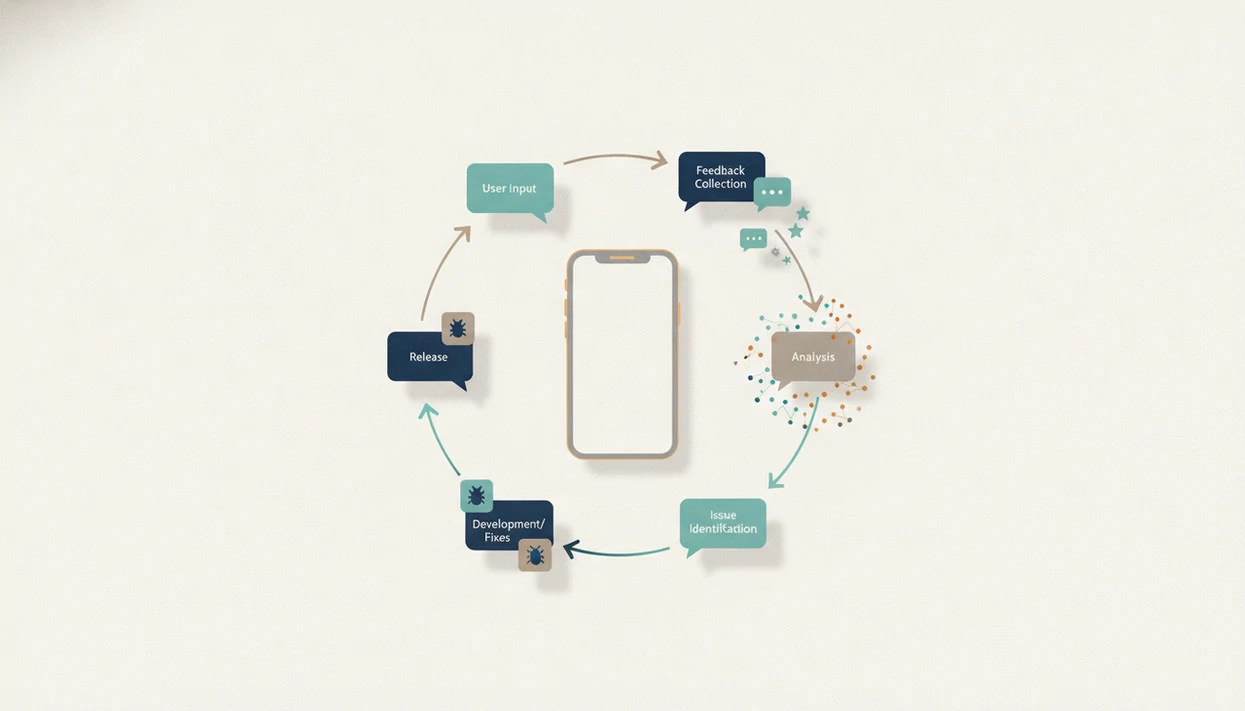
User feedback loops mobile apps are structured cycles for collecting user input, analyzing patterns, shipping improvements, and telling users what changed. The strongest loops combine in-app feedback, app store reviews, support tickets, analytics, and post-release measurement so teams improve the product without overreacting to noisy comments.
Definition: A user feedback loop in a mobile app is a repeatable product process that turns user comments and behavior data into prioritized decisions, shipped changes, measured outcomes, and visible follow-up.
TL;DR
- A mobile feedback loop is not just reading reviews; it is collect, analyze, prioritize, ship, measure, and respond.
- Use both qualitative feedback and quantitative signals so the team understands what users feel and what users actually do.
- The loop works best when feedback is segmented, routed into sprint planning, and closed with release notes, replies, or in-app messages.
User Feedback Loops in Mobile Apps: The Core Definition
A user feedback loop in a mobile app includes collecting, analyzing, acting, measuring, and following up on user signals. It is not the same as checking App Store reviews on Friday and dropping three complaints into Slack.
A working loop pulls from surveys, in-app prompts, app store reviews, analytics, support tickets, crash reports, and interviews. The team then sorts the evidence into product decisions. That distinction matters because a one-off review check captures noise, while a loop shows repeat patterns across segments and releases.
The cramped release note field is where the difference becomes visible. A team has to explain the fix plainly, without promising a feature that is not live. Done well, the loop supports product quality, retention, ratings, and the next submission checklist.
Five Facts About Mobile App Feedback Loops
- Feedback loops are continuous systems, not occasional research projects that happen after ratings drop.
- Qualitative input explains why users struggle, complain, request features, or abandon a flow.
- Quantitative app analytics shows scale, frequency, crashes, churn, conversion impact, and where the issue appears.
- Teams need multiple channels because app store reviews, support tickets, and surveys each overrepresent different users.
- Closing the loop with users builds trust and usually creates more specific future feedback.
A founder checking keyword rank in a spreadsheet before coffee may see one term move from position 18 to 23. That is not a feedback loop by itself. The useful question is whether ratings, onboarding completion, review language, and retention moved after the product change.
For mobile app teams, a feedback loop is often more reliable than raw review monitoring because it connects user comments to measured behavior.
How User Feedback Loops Work in Mobile Apps
User feedback loops work by moving a user signal into an insight, then into a roadmap item, shipped update, measured result, and user-facing follow-up. The operating model is simple. The discipline is not.
Behavioral analytics shows what users did. Crash reports show where the app failed. Surveys and interviews explain frustration in the user’s own words. Reviews and support tickets show public pain and private support cost. In 2023, smartphone users spent an average of 5.01 hours per day using mobile apps, according to data.ai’s State of Mobile report source.
Segmentation keeps the loop honest. Slice feedback by lifecycle stage, plan, geography, device, OS version, and cohort. A bug on older Android devices should not outrank a checkout issue affecting paid iOS subscribers without that context. Small user tests still matter too; Nielsen Norman Group explains that testing with five users can reveal most usability problems. Nielsen Norman Group’s usability-testing guidance explains the five-user finding and its limits for iterative testing source.
Requirements Before Building a Mobile Feedback Loop
Before building a mobile feedback loop, define the product goal and the owner. Common goals include retention, activation, ratings, monetization, usability, accessibility, and fewer support contacts.
Name the feedback owners across product, design, engineering, support, analytics, and marketing. Otherwise the backlog becomes a parking lot. We have seen the App Store Connect yellow warning banner appear before a build is submitted for review, while three unresolved “urgent” feedback items still had no assignee.
Set privacy, consent, and data minimization rules before collecting comments or behavioral data. Compare the policy text against the workflow, especially when feedback includes screenshots, account details, location, health, finance, or children’s data.
Start with two or three reliable channels. Then decide how feedback will be tagged, routed, scored, and reviewed. The broader mobile app product and ux process should define what enters the roadmap and what stays as research.
How to Use User Feedback Loops in Mobile Apps
Use a mobile feedback loop by keeping the first cycle narrow, measured, and tied to a release path. A loop that starts with every channel usually collapses into admin work.
- Set one measurable product goal, such as improving activation, reducing crashes, or lifting trial conversion.
- Collect feedback through two or three channels, not every possible source at once.
- Tag feedback by issue type, segment, severity, and business impact so comments become sortable evidence.
- Prioritize work using reach, impact, confidence, and effort or another scoring model the team already accepts.
- Ship the change through a normal release, beta, or feature flag workflow so engineering does not bypass the build train.
- Measure the result and communicate the change back to users through release notes, replies, support updates, or in-app messages.
Use a checklist that names the owner, feedback source, affected segment, app version, release path, measurement window, and user-facing follow-up; otherwise the loop becomes a nicer-looking backlog.
Best Feedback Channels for Mobile Apps
The best feedback channel depends on the question the team needs answered. Bugs, satisfaction, churn risk, feature demand, and usability problems usually show up in different places.
| Channel | Best for | Main caution |
|---|---|---|
| In-app surveys | Satisfaction, onboarding friction, feature fit | Can create prompt fatigue |
| App store reviews | Public complaints, feature requests, ratings themes | Not representative of all users |
| Support tickets | Bugs, billing, account blockers | Skews toward frustrated users |
| Analytics | Churn, conversion, frequency, funnel loss | Shows what, not always why |
| Crash reports | Stability, OS and device failures | Misses non-crash frustration |
| Interviews | Usability, motivation, decision context | Small sample size |
| Social media | Public sentiment, launch issues | High noise |
One iOS App Store study found that 55.2% of reviews contained at least one feature request source. Useful, but public reviews are not the whole user base.
Screenshot captions taped to a whiteboard often reveal the same thing: review language can improve messaging, onboarding, and app ui patterns, but it should not dictate every feature.
Step-by-Step Feedback Triage for App Product Teams
Feedback triage turns raw comments into roadmap-ready work through capture, deduplication, categorization, segmentation, scoring, assignment, and review. Without that flow, feedback becomes a noisy inbox.
Start by capturing each item with source, date, app version, device, OS, user segment, and any attached evidence. Deduplicate repeated complaints. Then categorize the issue as bug, usability issue, feature request, pricing concern, onboarding friction, performance complaint, accessibility problem, or unclear.
Next, segment and score. Prioritization signals include affected users, revenue impact, churn risk, support volume, rating impact, strategic fit, and engineering effort. Not every request should become a feature. Some requests are symptoms of confusing copy or poor defaults.
The practical bridge is sprint planning. Assign accepted items to a product owner, attach evidence, and require release notes when the change ships. The same routine helps teams keep mobile app onboarding fixes separate from unrelated feature work.
App Store Ratings and Discovery Effects of Feedback Loops
Feedback loops can support app store ratings and discovery over time by fixing review-driven bugs, reducing usability complaints, and improving the store listing’s conversion surface. They do not guarantee ranking gains.
Review responses and release notes close the loop publicly. A user who complained about login failures can see that the team shipped a fix. Future shoppers can see that the app is maintained. That matters when the ratings widget is circled in red marker before a listing review.
Review mining also helps messaging, screenshots, onboarding, and feature prioritization. If users praise one workflow repeatedly, the screenshot set may need to show it earlier. If trial confusion drives negative reviews, the pricing screen and metadata need review.
Do not manipulate reviews, gate rating prompts, or over-prompt satisfied users. The safer reading is simple: use feedback to improve the product, then ask at reasonable moments within platform rules. For the policy baseline, check Apple’s App Store Review Guidelines and Google Play’s ratings-and-reviews policies before changing prompt timing or review-copy workflows Apple source Google source. Tools like Power Themes can help teams separate store policy from marketer folklore.
Common Mobile Feedback Loop Mistakes
Common feedback loop mistakes make mobile teams collect more data while learning less. The problem is usually workflow quality, not user volume.
- Prompt fatigue: Asking too many users too often trains people to dismiss surveys and can hurt ratings.
- Loud-user bias: Treating angry comments as representative without segmentation can distort the roadmap.
- Ownerless collection: Collecting feedback with no product, support, or engineering owner creates backlog sludge.
- Comment-only analysis: Using qualitative comments without analytics hides scale, frequency, and conversion impact.
- Feature sprawl: Building every requested feature weakens product focus and increases maintenance cost.
- Silent follow-up: Failing to tell users what changed reduces trust and discourages future detail.
The dull routine matters here: Apple Developer documentation in one tab, Google Play policy in another, metadata open in the middle. Boring, yes. But that is where teams avoid risky prompts and misleading review requests.
Verification Metrics for Mobile App Feedback Loops
Verification metrics show whether a shipped feedback-driven change improved the app or merely cleared a backlog item. Track before-and-after results tied to the original goal.
Use retention, activation, crash-free sessions, conversion, rating average, review sentiment, CSAT, NPS, support volume, refund requests, and feature usage. Where practical, compare release cohorts, beta groups, feature flags, or A/B test variants. Also measure side effects. A shorter signup flow may lift activation but reduce trial quality.
A McKinsey analysis reported that companies using customer analytics extensively were more likely to outperform peers on sales growth and gross margin; treat that as business context, not a promise for one app release source.
Keep, roll back, or iterate based on evidence. A Play Console pre-launch report screenshot with red accessibility and crash markers should pause celebration, even if early conversion looks better. Power Themes covers related retention and distribution checks in mobile app growth.
Limitations
Feedback loops improve mobile product decisions, but they can mislead teams when sampling, privacy, or strategy is weak.
- Feedback can overrepresent loud, angry, highly engaged, or extreme users.
- Qualitative comments are noisy and may misstate the real behavioral cause of churn.
- Analytics can show what happened, but not always why it happened.
- Privacy, consent, platform rules, and data minimization limit what teams can collect.
- Early-stage or solo teams may lack time and tooling for a robust system.
- Feedback loops do not replace product strategy, taste, positioning, or judgment.
- Over-prompting can damage user experience and lower ratings.
- Segment-level improvements can hurt other cohorts if teams do not monitor tradeoffs.
- App store reviews are useful, but they skew toward users motivated to post publicly.
A feedback loop usually works best when the team treats it as decision support, while strategy sets the boundaries for what not to build.
FAQ
What is app user feedback?
App user feedback is direct and behavioral signal from people using a mobile app. It includes comments, reviews, survey answers, support tickets, analytics events, crash reports, and interview notes.
What is a feedback loop in a mobile app?
A feedback loop in a mobile app is the cycle of collecting feedback, analyzing it, acting on it, measuring the result, and following up with users. It turns user signals into product decisions and shipped changes.
Why do mobile apps need feedback?
Mobile apps need feedback to find bugs, reduce churn, improve usability, and choose better product priorities. Feedback also helps teams understand where ratings, onboarding, pricing, or performance are creating friction.
How do apps collect feedback from users?
Apps collect feedback through in-app surveys, app store reviews, support tickets, interviews, analytics, crash reports, beta programs, and social channels. Most teams should start with a few dependable channels before expanding.
Are app store reviews enough for a feedback loop?
App store reviews are useful, but they are not enough for a full feedback loop. Teams also need in-app, support, analytics, and crash signals to understand silent users and behavioral patterns.
How often should mobile app teams review feedback?
Mobile app teams should review feedback weekly for active products and more often during risky launches or major releases. Smaller apps may use a biweekly cadence if support volume and release frequency are low.
Who owns user feedback loops in an app team?
User feedback loops are usually shared by product, design, engineering, support, analytics, and growth. One accountable owner should manage triage so feedback does not stall between teams.
Can feedback loops hurt mobile apps?
Yes, feedback loops can hurt mobile apps when teams over-prompt users, collect biased samples, ignore privacy limits, or build too many requested features. Power Themes generally recommends treating feedback as evidence, not automatic instruction.