
Best Contraction Tracker Apps in 2026
Quick answer: Contraction Timer IO is the best fit for most readers because a partner or doula can follow contractions live from another phone. Contraction Timer & Counter 9m has far more App Store ratings and supports older iPhones. Storky is the better pick for sending a completed overview to a doctor or birth assistant.
At 3 a.m., with contractions five minutes apart and a partner circling the hospital parking lot, a contraction app needs one large button, readable intervals, and a history you can correct after a missed tap.
The apps below record contractions, but they differ sharply on live sharing, Apple Watch access, ads, subscriptions, and update history. A contraction tracker records your taps; it cannot diagnose labor or replace instructions from your obstetric provider.
Comparison at a glance
| App | Best for | Platforms | Free version | Price | Standout |
|---|---|---|---|---|---|
| Contraction Timer IO | Live partner and doula sharing | iPhone, iPad, Apple Watch, Android; browser access for followers | Core timing, history, 5-1-1 alerts, widgets, and offline use | $1.99 weekly or $5.99 purchase listed; checked October 2026 | Private link shows contractions live on another device |
| Contraction Timer & Counter 9m | Simple timing with a large rating base | iPhone, iPad, and Android | Basic timing is free; exact limits are not stated | $2.99 and $5.99 purchases listed; checked October 2026 | 69,312 US App Store ratings |
| Storky | Sending a contraction overview | iPhone and iPad | Timing and history are included; check the listing for ad limits | $2.99 Remove Ads purchase; checked October 2026 | Shares an overview by email or another app |
| Contraction Timer & Tracker (Going Merry) | Detailed logs and Apple Watch use | iPhone, iPad, and Apple Watch | Free download and trial; exact timer limits are not stated | $1.99 to $2.99 weekly or $19.99 to $29.99 yearly; checked October 2026 | Intensity, notes, graphs, editing, and full-screen timing |
| Full Term | Older iPhones and low-cost ad removal | iPhone, iPad, and Apple Watch | Contraction timer, kick counter, history, and graphs | $0.99 to remove ads; checked October 2026 | Runs on iOS 11.0 or later |
| Pregnancy+ | Pregnancy tracking with a timer included | iPhone and iPad | Pregnancy tracker and tools; contraction timer limits are not stated | Purchases from $0.99 to $34.99; checked October 2026 | Combines contraction timing with week-by-week pregnancy tools |
| BabyCenter Pregnancy Tracker | Current BabyCenter users | iPhone and iPad | Contraction timer and pregnancy tracker; no in-app purchases listed | Free; checked October 2026 | Pregnancy calendar, classes, community, and contraction timing |
Prices and ratings from the US App Store and Google Play, checked October 2026. Store prices change; the listing is the final word.
How we picked
We read the US App Store listings for all seven apps, the available Google Play listing data, and Contraction Timer IO's site. We checked feature descriptions, platform requirements, update dates, store ratings, purchase labels, and stated free tools in October 2026.
The order favors apps built for timing contractions during labor. Rating volume shows audience size, not fitness for this job: Contraction Timer IO ranks first with only 88 US App Store ratings because its live browser link solves a specific partner-sharing need that the larger apps do not list.
- Core timing must be quick and readable.
- History should support edits or missed entries.
- Sharing must fit partners or care teams.
- Prices and free limits must be visible.
- Platform reach and recent updates affect the order.

Contraction Timer IO
4.8 on the App Store (88 ratings) · 4.0 on Google Play (701 reviews)
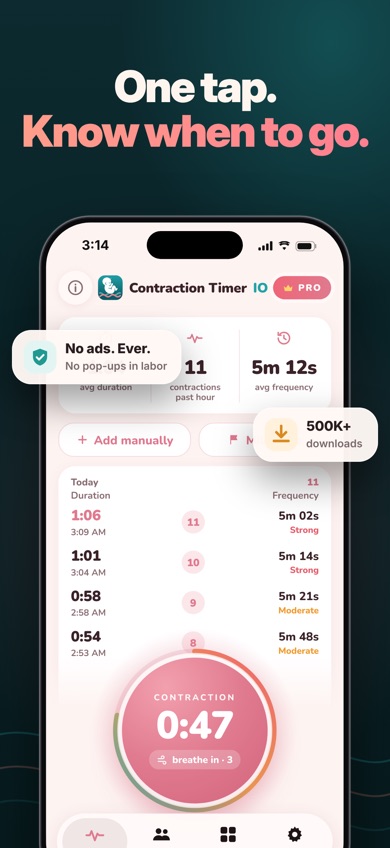
Contraction Timer IO is a dedicated contraction tracker with live viewing for a partner, doula, or family member. It records duration, start-to-start frequency, rest intervals, and your own intensity rating. The free tools also include editing, missed-entry support, labor-phase labels, a breathing guide, and a 5-1-1 alert.
The deciding feature is its private family link. Someone on another phone, tablet, or computer can watch new contractions appear without sharing your phone. Family members can send comments or hearts, which you can turn off. That is more useful during a split-location labor than emailing a finished log, and none of the other listings here describes comparable live browser viewing.
The iPhone app also has Lock Screen and Home Screen widgets plus Apple Watch timing. It was updated October 10, 2026, and has 4.82 stars from 88 US App Store ratings. Google Play shows 4.0 stars from 701 reviews and 50K+ installs. Those counts are far below 9m's, but fit drives this ranking. For a couple coordinating from separate phones, the live link is the stronger reason to download.
- Private live link works in a browser
- Timing continues offline
- No account needed for basic timing
- Live followers need internet access; the timer itself works offline.
- The iPhone version requires iOS 17.0+, and remote partner control is Pro.
- Price
- Free download; $1.99 weekly and $5.99 purchase listed in October 2026.
- Platforms
- iPhone, iPad, Apple Watch, and Android; browser viewing for followers.
Pick Contraction Timer IO if your partner or doula needs to follow labor live from another device.
Contraction Timer IO contraction tracker app for iPhoneContraction Timer IO for Android

Contraction Timer & Counter 9m
4.8 on the App Store (69,312 ratings)
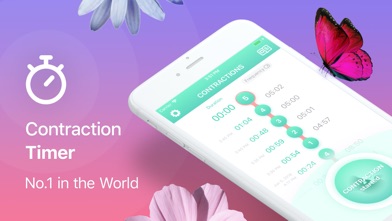
Contraction Timer & Counter 9m is a one-button contraction timer that calculates duration and frequency. Its main advantage is scale: 4.79 stars from 69,312 US App Store ratings. That is nearly 800 times Contraction Timer IO's iPhone rating count, although rating volume reflects the whole audience and does not add live sharing.
The interface is centered on tapping once at the start and again at the end. It analyzes the pattern and can issue a hospital prompt based on standard timing indicators. The listing also supports 32 languages and iOS 15.0+, so it is a better choice than IO for an older iPhone or a language that IO does not cover. Android availability is another reason to consider it.
The weak point is purchase clarity. The App Store lists $2.99 and $5.99 options under repeated Plus and Full Version labels, while the exact free-feature boundary is not stated. Check the listing before labor and open the timer once in advance. Its listing also describes no private live link, so a remote partner cannot follow in the same way as with IO. The last update was July 10, 2026.
- 69,312 US App Store ratings
- Supports 32 languages
- Works on iOS 15.0 or later
- Free limits and purchase labels are unclear.
- No live browser-sharing feature is listed.
- Price
- Free download; $2.99 and $5.99 purchases listed in October 2026.
- Platforms
- iPhone, iPad, and Android.
Pick Contraction Timer & Counter 9m if you want simple timing, broad language support, or compatibility with iOS 15.

Storky
4.9 on the App Store (1,927 ratings)
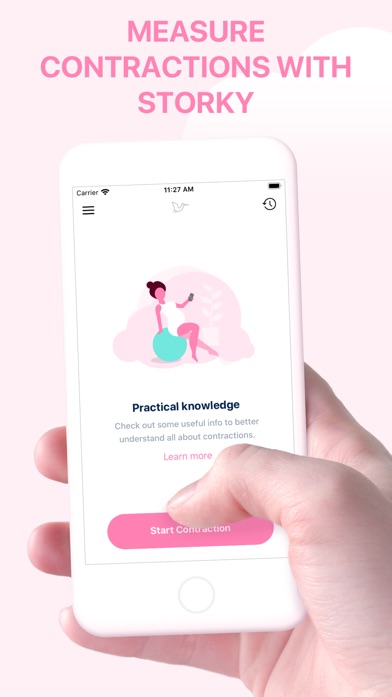
Storky is a focused timer that records contraction length and the interval between contractions. It has 4.85 stars from 1,927 US App Store ratings and was updated October 6, 2026. Its listing requires iOS 15.0+, which gives it wider older-iPhone support than the two iOS 17-only picks.
Storky's useful distinction is export. You can send an overview of contraction and interval lengths to a doctor or birth assistant by email or through another app. That is a static summary, not IO's live link, but it may fit a care team that wants a readable update without watching the entire session. Storky also keeps earlier monitoring sessions and includes basic information about timing contractions.
The app can issue a prompt when contraction length and spacing suggest it may be time to contact your hospital or birth center. Treat that prompt as informational because your provider may use a different threshold. Pricing needs a quick check: the description refers to an ad-free experience, while the App Store lists a $2.99 Remove Ads purchase. The current free-screen behavior is therefore unclear from the listing. There is no Android or Apple Watch version in the supplied store data.
- Exports a contraction overview
- Updated in October 2026
- Supports iOS 15.0 or later
- Sharing sends a summary instead of live updates.
- The listing is unclear about when ads appear.
- Price
- Free download; $2.99 Remove Ads purchase listed in October 2026.
- Platforms
- iPhone and iPad.
Pick Storky if you want to send a completed contraction overview to a doctor or birth assistant.

Contraction Timer & Tracker (Going Merry)
4.6 on the App Store (50,085 ratings)
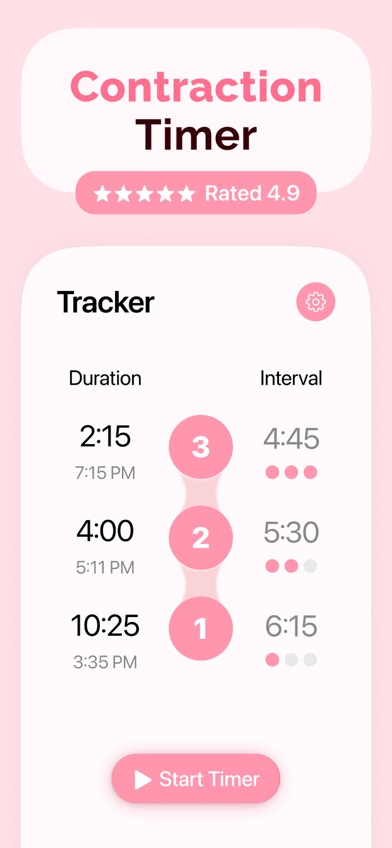
Contraction Timer & Tracker from Going Merry is the most detailed dedicated log in this comparison. Its listing includes one-button timing, automatic duration and interval calculations, intensity colors, personal notes, editing, graphs, averages, and an Apple Watch app. A full-screen mode may also be easier to hit during a contraction.
The numbers are strong: 4.63 stars from 50,085 US App Store ratings, with an update on September 29, 2026. It saves entries when you switch apps and has a hospital-bag checklist plus pain-relief exercises. Pick it over Storky when notes, intensity records, and graphs are more useful to you than a simple exported overview.
Cost pushes it below the first three. The store lists weekly Premium choices at $1.99 and $2.99, yearly choices at $19.99 and $29.99, plus $3.99 and $39.99 purchase labels. The description mentions a free trial, but it does not spell out how many contractions remain free after that trial. Check the payment screen before labor. It also requires iOS 17.0+, has a 17+ age rating, and lists only one language.
- Detailed notes, intensity, editing, and graphs
- Apple Watch and full-screen timing
- 50,085 US App Store ratings
- Weekly pricing can add up quickly.
- Free limits are not stated.
- Price
- Free download; $1.99 to $2.99 weekly and $19.99 to $29.99 yearly options listed in October 2026.
- Platforms
- iPhone, iPad, and Apple Watch.
Pick Going Merry if you want detailed notes, intensity records, graphs, and Apple Watch timing.

Full Term
4.8 on the App Store (7,226 ratings)
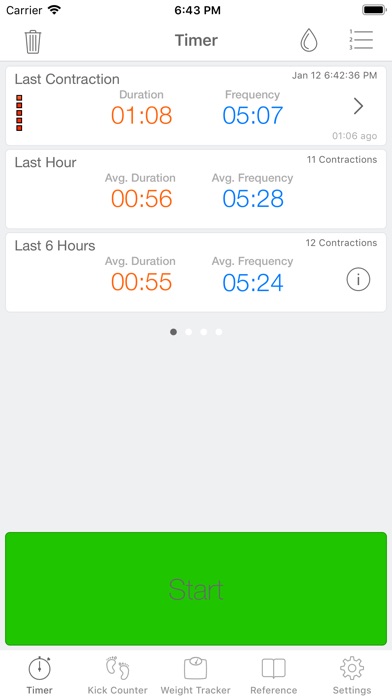
Full Term is a contraction timer with unusually broad editing tools for an app that runs on iOS 11.0+. It records timing, frequency, notes, and intensity; you can add missed contractions, undo mistakes, track water breaking, and customize a 5-1-1-style alert. It also has graphs, email export, Apple Watch support, a kick counter, and a weight log.
Its low price is another point in its favor. Core use is free, and the App Store lists $0.99 purchases for ad removal or support. It has 4.75 stars from 7,226 US ratings. For an older iPhone that cannot install an iOS 15 or iOS 17 app, Full Term may be the only compatible pick in this group.
The update date is the reason it ranks fifth: September 25, 2019. A seven-year gap raises questions about future iOS compatibility and unresolved bugs, even though the current listing remains available. The listing also names only one language and no Android version. Download it before your due date, verify that timing and export work on your device, and ask your provider which alert pattern to use.
- Runs on iOS 11.0 or later
- Manual entries and custom alerts
- Ad removal costs $0.99
- Last updated in September 2019.
- No Android version is listed.
- Price
- Free download; $0.99 ad-removal purchases listed in October 2026.
- Platforms
- iPhone, iPad, and Apple Watch.
Pick Full Term if you have an older iPhone or want extensive editing without a recurring subscription.

Pregnancy+
4.9 on the App Store (76,799 ratings)
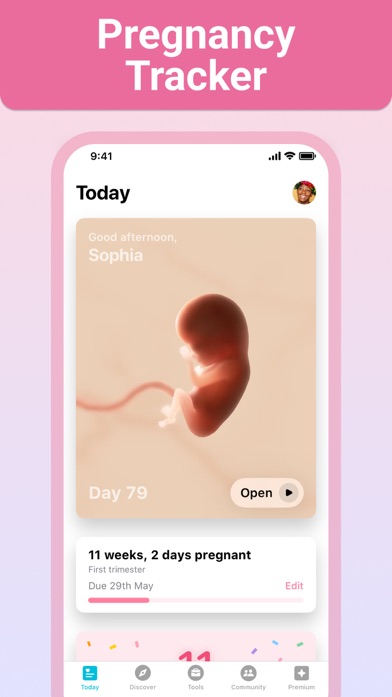
Pregnancy+ is a week-by-week pregnancy app with a contraction timer among its tools. It also has a kick counter, due-date calculator, weight log, appointment calendar, hospital-bag list, birth plan, and fetal-development models. That makes it a better fit for someone who wants one app from early pregnancy through labor.
The App Store numbers are substantial: 4.85 stars from 76,799 US ratings, with an update on August 10, 2026. The app supports 14 languages and requires iOS 16.4+. Its broader pregnancy coverage is the reason to pick it over a dedicated contraction tracker. If you already record appointments and kick counts there, keeping contraction timing in the same app cuts down on setup.
The contraction timer receives only a short description in the listing. There is no stated live partner link, Apple Watch control, editable contraction history, or detailed free limit for this specific tool. Paid options range from $0.99 point bundles to a $34.99 annual plan, with monthly and three-month choices also listed. Check the current timer screen and payment terms before relying on it during labor.
- Pregnancy tracking and labor tools in one app
- 76,799 US App Store ratings
- Supports 14 languages
- The listing gives few details about the contraction timer.
- No Android or Apple Watch support is confirmed here.
- Price
- Free download; purchases from $0.99 to $34.99 listed in October 2026.
- Platforms
- iPhone and iPad.
Pick Pregnancy+ if you want a pregnancy tracker first and a contraction timer as one included tool.

BabyCenter Pregnancy Tracker
4.9 on the App Store (298,423 ratings)

BabyCenter Pregnancy Tracker is a broad pregnancy and parenting app with contraction timing included for late pregnancy and labor. The rest of the app covers appointments, symptoms, kick counts, birth preparation, classes, fetal-development videos, community groups, and postpartum tracking.
It has the largest iPhone audience here: 4.89 stars from 298,423 US App Store ratings. It was also the most recently updated app in this comparison, on October 16, 2026. No in-app purchases appear in the supplied listing. Those numbers make it a sensible download if you already use its calendar, classes, or birth group and want basic contraction timing without adding another app.
It ranks last for this search because the listing gives almost no detail about the contraction timer itself. It does not specify editing, interval definitions, alerts, offline behavior, Apple Watch access, or sharing. The large rating count covers the entire pregnancy and parenting app, so it cannot tell you how buyers rate the timer alone. It also requires iOS 17.0+ and lists four languages. Choose a dedicated timer if labor controls are your main reason for downloading.
- 298,423 US App Store ratings
- Updated October 16, 2026
- No in-app purchases listed
- The contraction timer is described only briefly.
- Requires iOS 17.0 or later.
- Price
- Free; no in-app purchases listed as of October 2026.
- Platforms
- iPhone and iPad.
Pick BabyCenter Pregnancy Tracker if you already use its pregnancy tools and need only basic contraction timing.
Contraction Timer IO vs Contraction Timer & Counter 9m
These are the closest choices for a dedicated contraction tracker. IO wins on sharing and device controls; 9m wins on rating volume, older-iPhone support, and language count.
| Point | Contraction Timer IO | Rival |
|---|---|---|
| US store audience | 4.82 stars from 88 App Store ratings; 4.0 from 701 Google Play reviews | 4.79 stars from 69,312 App Store ratings |
| Remote sharing | Private browser link shows contractions live | No live remote-viewing feature listed |
| Quick access | Lock Screen widgets and Apple Watch timing | One-button in-app timing; Apple Watch support unknown |
| Paid options | $1.99 weekly and $5.99 purchase listed | $2.99 and $5.99 purchase labels; current structure unclear |
| Latest update | October 10, 2026 | July 10, 2026 |
Contraction Timer IO is the stronger pick when two people need the same live contraction record. A browser link is easier than reading intervals over a call, and the Lock Screen and Watch controls reduce phone handling.
Contraction Timer & Counter 9m wins if you value a far larger App Store rating history, need iOS 15 support, or want one of its 32 listed languages. Its basic one-button design also suits someone who has no need for remote viewing.
What to check before labor starts
Start, stop, and offline access
Open the timer before your due date and check how many taps it takes to start and stop. A large button, Lock Screen control, or Apple Watch app can help when reaching for the phone is difficult. Offline timing is useful in parking garages and hospital areas with weak service. Confirm that an interrupted connection will not erase the session.
Timing method and manual corrections
Frequency is generally measured from the start of one contraction to the start of the next. Some screens also show the rest interval from the end of one contraction to the next start. Look for labels that separate those figures. Editing and manual entry are valuable when you tap late, miss a contraction, or leave the timer running.
Live sharing or a static report
Decide who needs the data. A partner in another location benefits from a live browser link, while a doctor may prefer an emailed summary or a verbal report of recent duration and frequency. Check whether followers need an account, app, or paid plan. Also review whether a shared link expires when the session ends.
Weekly plans and post-birth charges
A $1.99 or $2.99 weekly plan can cost more than a one-time purchase if activated early. Check which tools stay free, when a trial renews, and whether the app has a lifetime option. If you subscribe, set a reminder to review the plan after birth. Store purchase labels can change, so confirm the payment screen.
Alerts, medical limits, and privacy
A 5-1-1 alert is a timing prompt, not a diagnosis. Ask your obstetric provider when to call because hospital instructions differ, especially for preterm labor or a prior fast delivery. Seek medical advice for heavy bleeding, severe constant pain, reduced fetal movement, or water breaking. Before sharing a labor log, read the current privacy label and policy for collection, retention, and third-party access.
Frequently asked questions
What is the best free contraction timer app?
Contraction Timer IO is our free starting pick because core timing, history, widgets, and 5-1-1 alerts are included. Optional weekly and $5.99 purchases are listed for paid tools.
Can my partner see my contractions live?
Contraction Timer IO creates a private browser link that lets a partner, doula, or family member follow contractions live. Followers need internet access, while basic timing can continue offline.
Which contraction app can share a log with my doctor?
Storky can send a contraction overview by email or through another app. Storky's sharing is a static summary, not a live feed.
What is the best pregnancy app with a contraction timer?
Pregnancy+ is the best fit here for week-by-week pregnancy tracking with a contraction timer included. Pregnancy+ also has kick counts, appointments, a hospital-bag list, and a birth plan.
How do I time contractions correctly?
Tap when a contraction begins and again when it ends; measure frequency from the beginning of one contraction to the beginning of the next. Record several contractions so your provider can review the pattern.
What does the 5-1-1 rule mean?
The 5-1-1 rule describes contractions about five minutes apart, lasting one minute each, for one hour. Your obstetric provider may give different instructions based on your pregnancy and medical history.
Can a contraction tracker tell if I am in true labor?
A contraction tracker can display duration and frequency, but it cannot diagnose true labor. Contact your obstetric provider if labor is suspected or you are unsure.
Are contraction timer apps safe to rely on?
Use a contraction timer as a record for you and your care team, not as the only basis for seeking care. Call your provider for urgent symptoms or any timing pattern that concerns you.
Our recommendation
Contraction Timer IO is our first download for most couples because its private live link lets a partner or doula follow the same contraction record from another device. Pick 9m for iOS 15 or broader language support, Storky for emailed summaries, Full Term for an older iPhone, or Pregnancy+ when you want one app for the whole pregnancy.
Contraction Timer IO is best for live family sharing
Contraction Timer IO is worth trying for one specific reason: its private link shows contractions live in another person's browser. That suits couples who may be apart when labor starts, a doula traveling to the birth location, or relatives waiting for updates without repeated calls. Core timing works offline, and the iPhone app also has Lock Screen and Apple Watch controls. Confirm the paid feature split before labor, especially if you want a partner to control the timer remotely.