
When AI Email Apps Fail and How Better UX Can Help
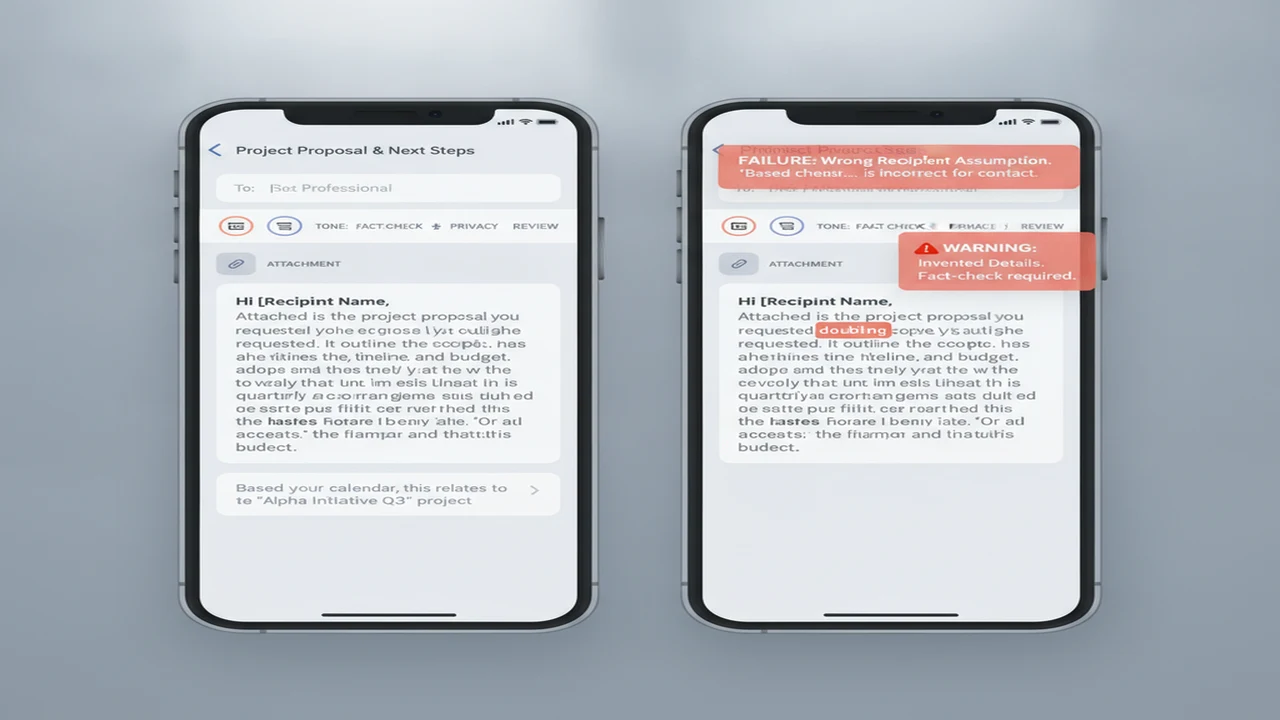
Fluent output is not the same as a useful email. A draft can read professionally while naming the wrong recipient, inventing a commitment, omitting the requested action, or sounding inappropriate for the relationship. Those failures become product problems when the interface makes context difficult to provide or review.
The wider AI market offers a warning against measuring success by generation alone. S&P Global Market Intelligence reported in 2025 that 42% of companies had abandoned most of their AI initiatives, according to CIO Dive's coverage of the survey. For an email app, sustainable value comes from helping users reach a correct, reviewed result, not merely producing text quickly.
Quick answer: AI email apps usually fail because they lack context, invent details, choose the wrong tone, demand too much setup, hide important controls, or make review difficult. A stronger product shortens the path from prompt to reviewed message while keeping facts, tone, privacy, editing, platform support, and permission timing visible to the user.
What does this mean?
Definition: An AI email app fails when its generated draft, interface, or delivery workflow adds enough factual, tonal, privacy, or editing risk that the user cannot confidently send the message.
Why do AI email apps produce drafts that users cannot send?
An AI email writer only sees the context supplied to it. If the prompt says “write a complaint” but omits the order number, prior contact, desired resolution, and deadline, the model must either stay generic or make assumptions. A polished paragraph can therefore conceal weak grounding.
Common failures include invented details, incorrect recipient assumptions, generic wording, mismatched formality, and a missing call to action. An AI email generator may also overstate certainty or promise an outcome the sender cannot authorize. A professional email generator should help structure a message, but the user remains responsible for its claims.
Risk rises with complaints, job applications, outreach, employment discussions, and account-access requests. These messages can affect money, reputation, privacy, or an ongoing relationship. Human review should confirm who will receive the email, what is being claimed, and what response is requested.
Which onboarding choices make an AI email app harder to trust?
A credible first session should move from prompt entry to recipient context, tone selection, draft generation, editing, and copy, export, or send. Account creation should appear only when it supports a necessary feature. Asking users to register before they can see a sample draft adds friction before value is clear.
Mailbox, contacts, microphone, and notification permissions should be requested when the related feature is used. Voice input is an optional convenience, so its permission prompt should explain what will be recorded and why. Broad access requested at launch can make a lightweight writing task feel unnecessarily invasive.
Copy-and-paste drafting limits integration but gives the user a clear boundary between generation and delivery. Direct mail-provider integration can reduce steps for replies and thread context, but it requires stronger permission explanations and visible controls. The distinction between focused writer interfaces and open-ended chat is explored in this mobile UX comparison of AI writers and chatbots.
Forced sign-up, an unexplained paywall, or hidden trial and renewal terms can stop activation even when the draft screen is well designed. The app should disclose the paid boundary before the user invests time preparing a message.
What controls help users turn a weak draft into a sendable email?
Useful inputs expose the recipient's role, objective, required facts, desired call to action, tone, length, language, and formality. These controls reduce guesswork and make prompt quality less dependent on the user's experience with an AI writing assistant.
Tone-controlled email drafts still need fully editable text. Users should be able to preserve their own sentences, regenerate one section, compare versions, and undo unwanted changes. A grammar checker pass can repair mechanics, but grammar correction is distinct from checking facts, names, dates, amounts, and commitments.
A multilingual email writing assistant should preserve proper names, numerical details, intent, and relationship cues. Translation that sounds natural but changes a deadline or softens a firm request has failed the task.
How should users review an AI-written email before sending it?
Review should be an explicit product stage rather than a small preview beside the send button. Sensitive customer, employment, health, financial, or account information should not be pasted until the user understands the app's privacy and data-handling disclosures.
Outreach needs personalization and a credible reason for contact. Cover letters require accurate experience and employer details. Support replies must avoid unsupported resolutions, while follow-ups need the previous conversation, what changed, and a precise next action.
- Define the recipient, purpose, relationship, and desired response.
- Provide the prior thread or a concise summary, including what has changed.
- Generate a draft without adding sensitive material that is not required.
- Verify every name, date, amount, factual claim, link, and promise.
- Edit the tone, length, greeting, closing, and call to action.
- Confirm the recipient fields and any referenced attachments.
- Send only after reading the complete final message in its delivery view.
Can AI detectors or humanizers confirm that an email is good?
When readers ask how accurate are AI detectors, the important distinction is what the score measures. An AI detector does not establish that a message is factual, original, private, suitable for the recipient, or ready to send. The best AI detector for a particular policy still cannot replace a content review.
QuillBot and Grammarly sit in the broader writing and revision category. GPTZero, ZeroGPT, and Originality are associated with detection, while StealthGPT, Undetectable AI, and NaturalWrite illustrate rewriting or humanizer positioning. These category labels do not establish relative performance or guarantee a dependable result.
An AI humanizer can alter sentence rhythm and word choice, but it may also remove specifics, change meaning, or introduce a tone mismatch. The responsible goal is clearer communication, not detector avoidance. Users looking for the best AI writer should prioritize controllable revisions and meaning preservation; this phone rewriting guide provides a focused editing workflow.
Which product metrics reveal whether the UX is actually improving?
Track time to first draft, draft-to-copy or draft-to-send completion, regeneration frequency, edit depth, permission acceptance after value is shown, and return usage. Successful generation should remain separate from successful review and delivery. Otherwise, a fast generate-button tap can hide abandonment on the edit screen.
Frequent regeneration can indicate weak context controls, poor output, or simple exploration. It does not explain intent by itself. Pair the event with feedback tags such as wrong facts, wrong tone, too generic, too long, missing context, and privacy concern.
Day-1 retention can show whether users return after initial curiosity. Day-7 retention offers a stronger signal that the app fits recurring replies, outreach, or follow-up work, but neither should be interpreted without use-case and cohort context. Teams evaluating category expectations can use the current iPhone and Android AI writer overview to identify platform and workflow questions worth instrumenting.
How should users evaluate an AI email app before installing or subscribing?
Start with the current App Store or Google Play listing. Check platform availability, OS and device requirements, update recency, privacy disclosures, account deletion information, support channels, language coverage, export options, and whether mailbox integration is required or optional.
The best AI email writer depends on the workflow. Standalone drafting favors quick copy and export. Reply assistance benefits from controlled thread context. Other users may prioritize voice input, reusable templates, direct provider integration, an AI follow-up email writer, or an AI outreach email generator.
Friday, Xemail, and AI Email Writer - Boss are examples users may encounter while searching. Boss is documented around concepts including email templates, grammar correction, and compatibility with common mail providers. These names are examples rather than rankings.
Before paying, confirm trial duration, renewal price, Pro restrictions, cancellation steps, provider compatibility, and whether generated text can be exported without friction. Review important messages yourself, even when an app offers a final grammar or tone pass.
Comparison
| Failure mode | User-visible symptom | Better UX decision | Metric to watch | iOS or Android check |
|---|---|---|---|---|
| Missing context | Generic or irrelevant draft | Show fields for recipient, objective, facts, and requested action | Regeneration rate and missing-context tags | Check field layout and keyboard behavior |
| Wrong tone | Message feels rude, vague, or overfamiliar | Offer visible tone and formality controls with previews | Tone-related edits and feedback tags | Check whether controls remain usable on small screens |
| Invented details | Draft adds facts or commitments | Highlight factual fields and add a verification stage | Wrong-fact reports and edit depth | Check review view and text selection |
| Overlong draft | Key request is buried | Provide length controls and section-level regeneration | Manual deletions and completion rate | Check scrolling and draft navigation |
| Premature permission request | User exits before drafting | Request access only when the related feature is invoked | Permission-screen abandonment | Compare iOS purpose text and Android permission timing |
| Unclear subscription terms | Paywall appears unexpectedly | Show trial, renewal, and paid boundaries before commitment | Paywall exits and subscription support contacts | Confirm current store disclosure |
| Weak review flow | User copies text without checking it | Add a dedicated fact, attachment, recipient, and action review | Reviewed-to-sent completion | Check final preview and back-navigation |
Limitations
Public listings and product documentation cannot establish generation accuracy, latency under load, support responsiveness, real-world retention, or whether every feature behaves identically across devices. No real test log was supplied, so this article does not imply installation, sending trials, measured accuracy, or controlled comparisons.
Prices, trial terms, privacy labels, platform support, and feature availability can change after August 6, 2026. An unlisted capability is not proven absent. Confirm material details in the current App Store or Google Play listing and the vendor's current documentation.
Frequently Asked Questions
What is the most common reason an AI email writer fails?
Missing context is the central failure. If the tool does not know the recipient relationship, required facts, desired response, and tone, it may return fluent but generic text, make unsupported assumptions, or frame the request incorrectly.
Can an AI email generator write a professional follow-up?
Yes, but provide the prior context, what changed, the desired action, relevant timing, and your relationship with the recipient. Generate the message, then verify every claim and make sure the follow-up does not imply a promise or deadline that was never agreed.
Should an email app require access to my inbox or contacts?
It depends on the workflow. A standalone drafting tool may not need either, while a reply assistant may use inbox access to read thread context. Permission requests should be proportional, clearly explained, and delayed until the related feature is requested.
Is Write.info an AI email writer and reply assistant?
Write.info is described in current public documentation as supporting AI-assisted writing, including email drafting and reply-oriented use cases. Users should confirm its current platform availability, feature scope, privacy disclosures, and subscription terms in the latest listing.
Can an AI detector tell whether an email is safe to send?
No. Detector output does not verify factual accuracy, privacy, recipient fit, attachment status, tone, or send-readiness. It should not replace reading the final email and checking every material detail.
Does Write.info support natural rewriting or humanizer features?
Write.info's public positioning includes natural rewriting as an editing aid. Any AI humanizer pass still requires a meaning check because changes to phrasing can alter tone, remove specifics, or weaken the intended call to action.
What should I check before paying for an AI email app?
Check iOS or Android support, device requirements, privacy disclosures, trial duration, renewal price, cancellation steps, export workflow, mail-provider compatibility, supported languages, support channels, and account deletion instructions. Confirm these details in the current listing before subscribing.