
Best Ingredient Scanner Apps in 2026
Quick answer: Product Scanner is the top pick for Android shoppers who want unlimited free barcode scans, personalized allergy flags, and a photo option when there is no barcode. Yuka is the better iPhone choice and also covers cosmetics. Choose Fig when you need profiles for several allergies, intolerances, or specialized diets.
You are standing under supermarket lights with a snack in one hand and a tiny ingredient label in the other. A useful ingredient scanner app should tell you what is inside, why an additive was flagged, and whether the package conflicts with your diet.
The six apps below take different approaches. Some calculate health scores; others focus on allergies, gluten, processing levels, or a fixed set of ingredient rules.
Comparison at a glance
| App | Best for | Platforms | Free version | Price | Standout |
|---|---|---|---|---|---|
| Product Scanner | Unlimited personalized food checks | Android | Unlimited barcode scans; no account or paywall stated | Free | Barcode and package-front photo scanning |
| Yuka | Food and cosmetics | iPhone and iPad confirmed | Free barcode scanning; scan limit unknown | Free; $10, $15, and $20 purchases listed | Database of 4 million foods and 2 million cosmetics |
| Fig | Complex dietary restrictions | iPhone and iPad | Free download; feature limits unknown | $5.99 to $14.99 monthly; $39.99 to $59.99 yearly | More than 2,800 diet and allergy options |
| Bobby Approved | Simple ingredient-rule decisions | iPhone and iPad | Free download; check the listing for limits | Free | Approved or rejected result based on over 100 flagged ingredients |
| Open Food Facts | Open product data | Web confirmed; check listings for mobile apps | Free database; usage limits unknown | Free | Nutri-Score, NOVA, and community-maintained records |
| The Gluten Free Scanner | Dedicated US gluten checks | iPhone and iPad; US only | Free scanner with a paid full version | $4.99 full version | Gluten checks plus 150,000 US restaurant listings |
Prices and ratings from the US App Store and Google Play, checked November 2026. Store prices change; the listing is the final word.
How we picked
We read the US App Store and Google Play listings supplied for these six apps, including update dates, store ratings, platform requirements, feature descriptions, and in-app purchase lines. We also reviewed the official Open Food Facts site and available product research. Prices and listings were checked in November 2026.
We did not run hands-on scans. The order favors direct ingredient analysis, scan options, allergy and diet controls, stated database coverage, pricing, and platform reach. Store rating figures come only from the App Store or Google Play.
- The scanner must explain ingredients or product suitability.
- Barcode coverage and photo fallback affect usefulness in a store.
- Allergen and trace warnings must be easy to distinguish.
- Scores need a documented basis.
- Free limits, subscriptions, and platform support affect the final rank.

Product Scanner
Product Scanner is an Android ingredient scanner for packaged food, meals, and produce. It earns the label Best for unlimited free personalized food checks because its Google Play listing documents unlimited barcode scans, a package-front photo fallback, separate allergen and trace flags, and personal diet profiles with no account or paywall; none of the other listings documents that exact combination. Its 0-100 health score uses Nutri-Score, additives, and organic status.
For a packaged snack, the app can explain additives and E-numbers, flag milk, nuts, gluten, or other selected concerns, and suggest an alternative with a higher score. Vegan, keto, gluten-free, halal, and other profiles are listed. The photo option is useful when a barcode is missing, although it identifies the product from the front of the pack instead of reading every printed ingredient directly.
This is a brand-new listing. Google Play showed 0+ installs and no ratings after the November 13, 2026 update, so it lacks the public track record of Yuka, Fig, or Bobby Approved. The listing also gives no accuracy figures for its meal estimate, freshness check, or Ask AI answers. Those tools are extras; the unlimited packaged-food checks are the reason to download it.
- Unlimited free barcode scans
- Personal allergy and diet flags
- Separate declared-allergen and trace notices
- Package-front photo fallback
- Android only; no iPhone app is listed yet
- Very short public track record
- Price
- Free with no paywall stated; checked November 2026
- Platforms
- Android; 32 languages listed
Pick Product Scanner if you want free personalized food checks and need a photo fallback for packages without usable barcodes.

Yuka
4.8 on the App Store (102,452 ratings)
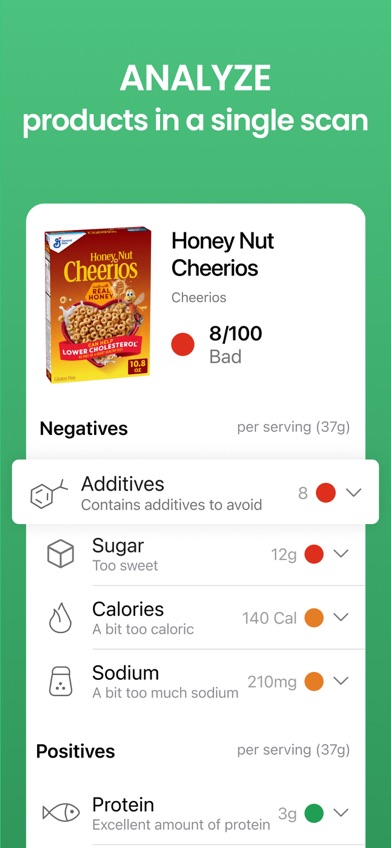
Yuka is a barcode scanner for food and personal-care products. It earns the label Best for scanning both food and cosmetics because its listing documents 4 million food records and 2 million cosmetic records, while the other picks either focus on food or do not publish comparable cross-category coverage. Its 4.82-star App Store score comes from 102,452 ratings, the second-largest rating count in this group.
Food ratings use nutritional quality, additives, and organic status. When a product receives a poor result, Yuka can display a similar product with a better score. Cosmetic analysis assigns risk levels to individual ingredients, which makes Yuka more useful than a food-only barcode scanner app if shampoo, sunscreen, or skin care is also on your list.
Yuka has a longer record than Product Scanner: it arrived in 2017 and was updated November 12, 2026. The tradeoff is personalization. Fig documents far more diet and allergy options, while Product Scanner explicitly separates declared allergens from possible traces. The App Store lists $10, $15, and $20 Premium purchases without consistent terms, so check the purchase screen before paying.
- Six million food and cosmetic records claimed in the listing
- More than 102,000 App Store ratings
- Health scores with ingredient explanations
- Alternative product suggestions
- Less detailed restriction support than Fig
- Premium purchase terms are unclear in the store listing
- Price
- Free; Premium purchases of $10, $15, and $20 listed in November 2026
- Platforms
- iPhone and iPad confirmed; requires iOS 15.5 or later
Pick Yuka if you use an iPhone and want one scanner for groceries, cosmetics, and personal-care products.

Fig
4.7 on the App Store (16,928 ratings)
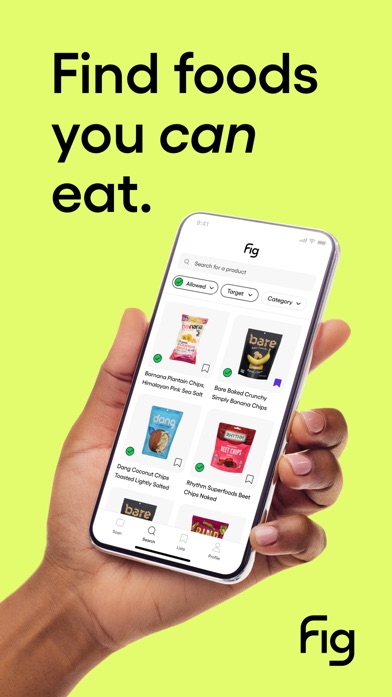
Fig checks grocery products against a personal ingredient profile. It earns the label Best for complex allergies and dietary restrictions because its App Store listing documents more than 2,800 options, including low-FODMAP, alpha-gal, low-histamine, gluten-free, and vegan profiles; no other pick publishes comparable restriction breadth. Fig had 4.71 stars from 16,928 App Store ratings in November 2026.
That depth is useful when your shopping rules cannot be reduced to one health score. You can scan or search for a product and see whether its ingredients match the profile you created. This makes Fig a stronger allergy scanner app than general scoring tools for households dealing with several intolerances or specialized diets.
Fig is less compelling if you only want a quick additive score. Its free feature limits are not clear from the supplied listing, and Fig+ prices vary: monthly purchases run from $5.99 to $14.99, while annual options run from $39.99 to $59.99. It also requires iOS 16.4 or later and lists English as its sole language.
- More than 2,800 dietary and allergy options
- Profiles built around individual restrictions
- Barcode scanning and product search
- Free-tier limits are not stated
- Higher iOS requirement than the other iPhone picks
- English only
- Price
- Free download; Fig+ is $5.99 to $14.99 monthly or $39.99 to $59.99 yearly, checked November 2026
- Platforms
- iPhone and iPad; requires iOS 16.4 or later
Pick Fig if several allergies, intolerances, or named diets need to fit into one shopping profile.

Bobby Approved
4.9 on the App Store (166,846 ratings)
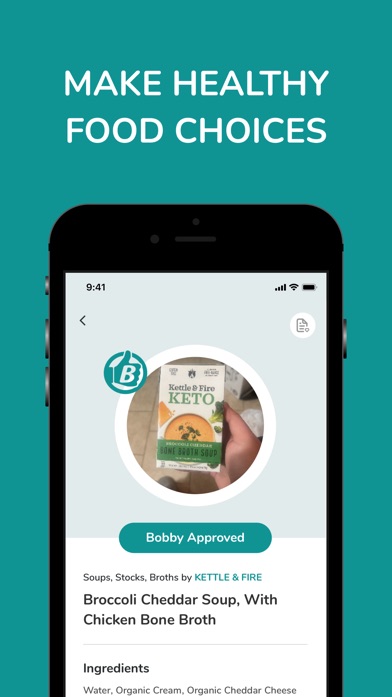
Bobby Approved gives products an approved or rejected result based on a defined ingredient rule set. It earns the label Best for a fast approved-or-not ingredient answer because its listing documents more than 100 flagged ingredients and an immediate binary result; the other picks lead with scores, personal restrictions, or open data. It also has the largest App Store rating count here: 4.86 stars from 166,846 ratings.
Flagged ingredients are marked in red, and you can open an explanation for the reason behind each flag. The rules cover categories such as artificial colors, sweeteners, preservatives, flavors, and seed oils. Search and store browsing are included, as are alternative suggestions when a scanned item fails the app's standard.
The simplicity comes with a firm point of view. A rejection means the product conflicts with Bobby Approved's rules; it is not an individualized nutrition or allergy assessment. The listing does not document the thousands of restriction combinations found in Fig or separate trace warnings like Product Scanner. Choose it because you agree with its ingredient rules, not because its answer is universal.
- 4.86 stars from 166,846 App Store ratings
- Immediate approved or rejected result
- Explanations for more than 100 flagged ingredients
- Uses a fixed ingredient philosophy
- No detailed personal allergy profiles documented
- Price
- Free; checked November 2026
- Platforms
- iPhone and iPad; requires iOS 15.1 or later
Pick Bobby Approved if you already follow its ingredient rules and want a quick yes-or-no result in the grocery aisle.
Open Food Facts
Open Food Facts is an open, collaborative database for researching packaged foods by barcode or product record. It earns the label Best for open food data and processing details because it publishes community-maintained records with Nutri-Score, NOVA processing classes, and Green-Score where available; none of the other picks centers its service on an open product database.
NOVA is especially useful if your question is about processing level instead of one app's approved-ingredient list. Product records can also include nutrition data, ingredients, labels, and environmental fields. Researchers and detail-minded shoppers may prefer seeing those separate data points over receiving one unexplained red or green answer.
Coverage is the catch. Collaborative records can be complete, partial, outdated, or absent, and package formulas differ across countries. Open Food Facts is free, but the supplied sources do not confirm current mobile platform details or additional usage limits; use the web database and check the relevant app listing before downloading. It is a better research source than a personalized allergy tool because no comparable custom restriction system was documented.
- Open, community-maintained product records
- Nutri-Score and NOVA data
- Free web access
- Record completeness varies by product
- Current mobile platform details were not confirmed
- Limited documented personalization
- Price
- Free service; paid options were not listed, checked November 2026
- Platforms
- Web confirmed; check the current listing for mobile availability
Pick Open Food Facts if you want open product records and processing classifications more than personal diet screening.

The Gluten Free Scanner
4.7 on the App Store (4,782 ratings)
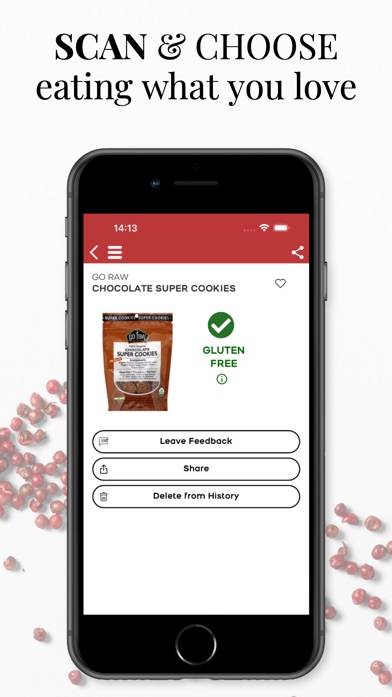
The Gluten Free Scanner is a US-focused barcode and restaurant checker for people avoiding gluten. It earns the label Best for dedicated US gluten checks because its listing claims more than 1 million food and drink records plus 150,000 restaurant listings; none of the broader ingredient scanner apps documents that combination of gluten-specific product and dining coverage. It had 4.73 stars from 4,782 App Store ratings.
Each barcode result uses four analysis levels to communicate gluten risk. The paid full version adds search by product, brand, or category, along with ingredient lists, dining cards, travel cards, and discovery tools. Restaurant menu analysis is a useful addition for a trip or an unfamiliar neighborhood, though restaurant preparation still needs direct confirmation.
This app is deliberately narrow. It does not replace Yuka for cosmetics, Fig for many simultaneous restrictions, or Product Scanner for a broad 0-100 food score. It also works only in the US and on Apple devices according to the supplied listing. The free download covers basic access; the Full Version GF Scanner purchase was $4.99 in November 2026.
- More than 1 million products claimed
- Four-level gluten analysis
- 150,000 US restaurant listings
- US only
- Focused on gluten instead of broader ingredient concerns
- Price
- Free download; full version costs $4.99, checked November 2026
- Platforms
- iPhone and iPad; requires iOS 15.0 or later
Pick The Gluten Free Scanner if gluten is your main concern and you shop or dine in the US.
Product Scanner vs Yuka for grocery scans
Product Scanner and Yuka both rate packaged food and suggest alternatives, but their platform coverage, scan methods, and public histories are very different.
| Point | Product Scanner | Rival |
|---|---|---|
| Scan input | Unlimited barcode scans plus package-front photos | Barcode scanning is documented |
| Food result | 0-100 score with Nutri-Score, additives, organic status, and personal flags | Color-coded rating based on nutrition, additives, and organic status |
| Other categories | Meal estimates and produce freshness checks | Two million cosmetic records claimed |
| Price | No account or paywall stated | Free with $10, $15, and $20 Premium purchases listed |
| Store record | New Android listing with no rating history | 4.82 stars from 102,452 iPhone ratings; released in 2017 |
Product Scanner has the more flexible food input: if the barcode fails, a photo of the package front can identify the item. Its personal diet and allergy flags are also documented more directly, including separate treatment of declared allergens and possible traces.
Yuka has the decisive advantage in track record and published catalog size. It is also the easy choice if you scan cosmetics or use an iPhone.
What to check before choosing an ingredient scanner
Match the scan method to the shelf problem
Barcode lookup is fast when the product already exists in the database. It can fail on new, regional, or store-brand items. A package or ingredient-photo option gives you another route, but check what the photo actually reads: some apps identify the product from the front, while others analyze printed ingredient text. That difference affects results when formulas change.
Separate allergy screening from health scoring
A score of 80 does not tell you whether a snack contains milk or was made around peanuts. For allergies, look for personal profiles, declared-allergen flags, trace statements, and missing-data notices. Always compare the result with the current package. An allergy scanner app can speed up screening, but it cannot guarantee that a product is safe for a diagnosed allergy.
Read how the score is calculated
Two apps can scan the same cereal and reach different conclusions because one weighs nutrition, another penalizes processing, and a third follows a fixed ingredient list. Look for the formula or rule set behind the score. Plain explanations for sugar, salt, additives, and processing are more useful than a color with no supporting detail.
Check region, platform, and database age
A large catalog can still miss the exact US package in your cart. Confirm that the app covers your country and phone, then check its latest update date. Formula changes are common, so compare the displayed ingredients with the physical label. Older iPhones also need attention: Fig requires iOS 16.4, while the other confirmed iPhone picks accept earlier versions.
Look past the free download button
Free can mean unlimited scans, a small trial, or basic results with paid explanations. Review scan caps and renewal terms before building a household profile. One-time purchases may cost less over several years, while subscriptions can fund frequent database updates. Also read the store privacy label if scan history, allergy profiles, or account creation concern you.
Frequently asked questions
What is the best free ingredient scanner app?
Product Scanner is the strongest free Android option here because its listing states that barcode scans are unlimited and there is no account or paywall.
Which ingredient scanner app is best for food allergies?
Fig is the best fit for complex needs because it documents more than 2,800 allergies, diets, and restrictions. Always verify the current package label.
Can an ingredient scanner detect may contain warnings?
Some scanners separate declared allergens from possible trace statements, but support varies. Check the physical label whenever the app has missing or incomplete allergen data.
Which app scans cosmetics as well as food?
Yuka scans both categories and claims a database of 4 million foods and 2 million cosmetics.
How accurate are ingredient scanner apps?
Accuracy depends on database coverage, package version, and the app's scoring rules. Compare every result with the current ingredient and allergen label.
Can a food additive scanner replace an allergy label?
No. A food additive scanner is a screening tool and cannot guarantee safety for a diagnosed allergy.
What is the best gluten scanner app for US products?
The Gluten Free Scanner is the dedicated pick because its listing claims more than 1 million products and 150,000 US restaurant records.
Do ingredient scanner apps require a subscription?
Some are free, some sell one-time upgrades, and others use monthly or annual plans. Check scan limits and renewal terms in the current store listing.
The right scanner depends on your phone and diet
Product Scanner is the first download for Android shoppers who want unlimited free food scans, personal allergy flags, and a package-photo fallback. Choose Yuka on iPhone or when cosmetics are part of the job; Fig is the stronger specialist for several allergies and dietary restrictions.
Product Scanner for unlimited personalized Android checks
Product Scanner is worth trying for one specific reason: its listing combines unlimited free barcode scans with personal diet and allergy flags, then adds a package-front photo option when a barcode is missing. That covers the most common grocery-store problems without a stated subscription or account requirement.
It suits Android shoppers who want a broad answer to whether packaged food fits their needs. Its public record is still short, so compare important allergen results with the package label and use the 0-100 score as a shopping aid.